Defect report software on the phone
DefAct is an app for equipment defect detection on site: the technician fills the report on the phone, offline, with a photo of every defect and signatures, and the customer gets the PDF and approves it by link.
- Works offline — the document is sent once there is a connection.
- Every defect has a unit, description, severity, recommendation and photo.
- PDF with a server-issued number and a QR code for authenticity checks.
- From the report to a work order in one button, with the same data.
«Master» — 499 ₽ per month for one user. For companies — from 9 900 ₽ per year for 5 employees up to 99 900 ₽ for 100. The first 30 days are free, no card.
How it looks
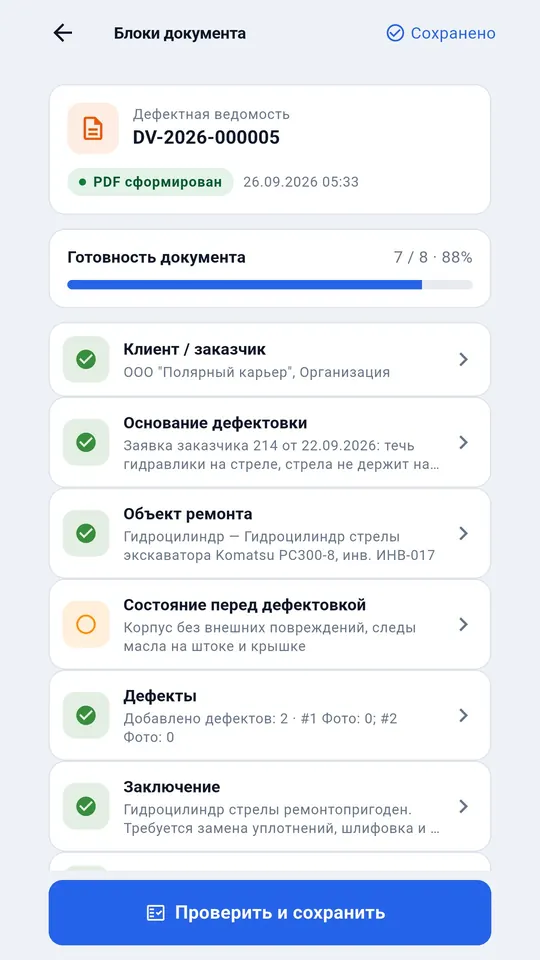
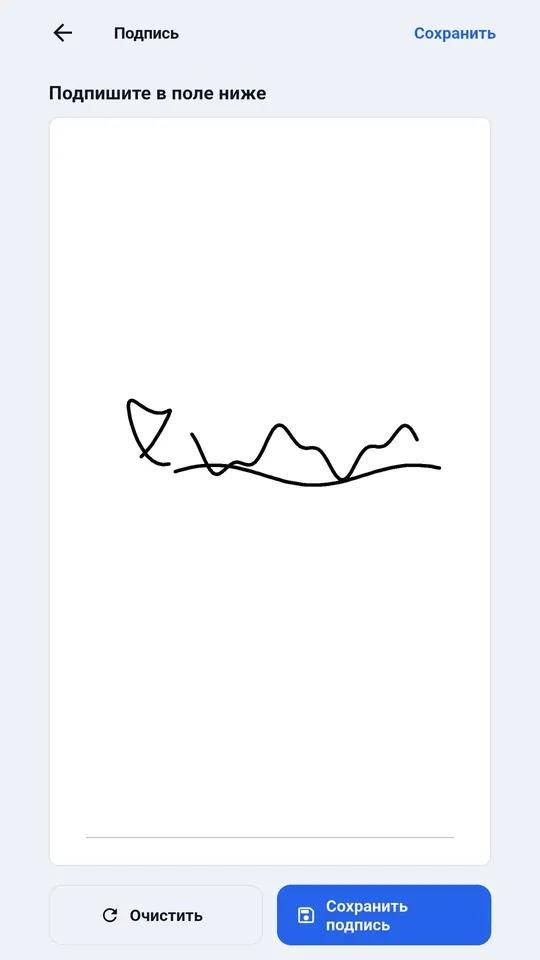
App screens on a demo company; the data is fictional.

What it does
Only what the app does today.
The document by blocks
Customer, basis, object of repair, condition, defects, conclusion — you can see what is left to fill.
Defects with photos
Each defect is a card with the unit, severity, recommendation and camera shots.
Signatures on the screen
The technician and the customer's representative sign with a finger inside the document.
Number and QR code
The number is issued by the server and is the same across the company; the QR code on the PDF lets the customer verify the document.
Approval by link
The customer opens the report by link, approves it or returns it with a remark — no calls, no scans.
Next comes the work order
The report turns into a work order — the machine, the customer and the defects carry over.
How it differs from what you already have
We compare approaches, not other products; accurate as of October 2026.
| DefAct | Paper | Excel or Word | Messenger | General-purpose CRM | |
|---|---|---|---|---|---|
| Fill in on site offline | Yes, on the phone | Yes | On a laptop | Leaves once there is a connection | Usually needs a connection |
| Photos inside the document | For every defect | No, kept separately | Paste by hand | Separate from the text | As an attachment |
| Signature on site | On the phone screen | Yes, with a pen | After printing | No | Depends on the system |
| One numbering across the company | The server issues the number | A paper register | By hand | No | Yes |
| Customer approval | By link, answer in the system | Drive over or scan | By email | By message | If the customer has a portal |
| Ready PDF | One button | A scan | Save as PDF | No | Through print templates |
| How long to set up | Installs in an evening | None needed | Your own template | None needed | Implementation and setup |
Questions and answers
Can the report be filled without internet?
Yes. The document, photos and signatures are stored on the phone and go to the server and the customer once there is a connection. The server issues the document number on the first sync.
How does the customer receive the report?
A PDF and a link where the document can be opened, approved or returned with a remark. The customer does not need an account for that.
Can we use our own report form?
The fields in DefAct are the same as in our blank — basis, object, defects, parts, conclusion, signatures. If you only need the blank without the app, download it for free.
See also
- Defect report: free blank and sample — if you only need the file.
- Forestry — harvesters, forwarders and log trucks — defect reports at the cutting area with no signal.
- Mining — mine haul trucks, drill rigs, crushers and conveyors — scheduled inspections.
- Work order software
- Special equipment service software
- Field service software
- Full pricing — what is included, how to pay, what happens after 30 days.
Try it on your own documents
Sign up by email, 30 days free with full functionality, no card needed. The app runs on Android and Windows.